The auto-reply function is very useful for users who cannot reply to messages immediately. Even if you’re busy, sleeping, or not near your phone, you can still reply quickly with it. In JT WhatsApp APK, this feature is more flexible and can be adjusted according to different situations, helping users manage personal and work conversations more efficiently without missing important messages.
This guide will show you how to set up smart auto-responders, the available options, and how to make your replies more natural and fluent.
What Is an Intelligent Auto-Reply?
An auto-reply is a message that is sent automatically when someone sends you a message. In JT WhatsApp, this feature can do more than sending the same reply every time, especially in the JT WhatsApp latest version, where users can set custom responses based on keywords, contacts, or specific situations. That is why many users call it an “intelligent” auto-reply.
Unlike a basic auto-response, a smart auto-reply can react based on different conditions. For example, it may:
- Reply only to certain contacts
- Ignore group chats if needed
- Trigger when someone uses a specific word or phrase
- Send different replies at different times of the day
- Work only during selected hours, such as work time or sleeping hours
This makes your messages feel more natural and practical. Instead of sending duplicate messages to everyone, the app responds more intelligently based on the sender and the time of sending.
Why Use Auto-Replies?
Automatic replies are very useful in daily life. It helps you stay connected even if you can’t check your phone immediately. Instead of making the other party wait anxiously, let the app automatically send you quick messages.
This is especially helpful when you are:
- Working and unable to reply during office hours
- Driving, traveling, or attending meetings
- Sleeping or taking a break from your phone
- Busy with study, family time, or other tasks
Auto-responders can also make communication more organized, especially after a JT WhatsApp update. The person who sent the message knows that their message has been received and that you may reply later, which helps reduce misunderstandings and avoids repeated follow-up messages like “Are you there?”
For small business users, automatic replies are more practical. If a customer inquires about products, prices, or business hours, an automated reply can quickly provide an answer before you can reply manually.
Another benefit is that it saves time. You don’t need to type the same message over and over again; just let the app handle common replies automatically. This saves time and keeps the conversation active, allowing you to participate even when you’re not around.
With proper settings, auto-response can make communication in personal and professional settings easier, smoother, and more professional.
Steps to Set Up Auto-Replies in JT WhatsApp
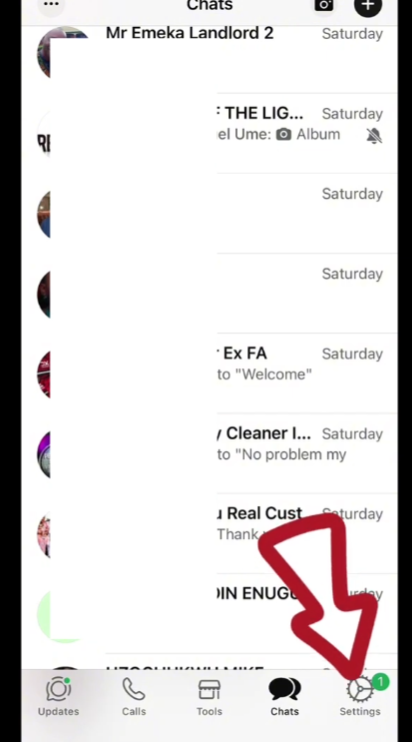
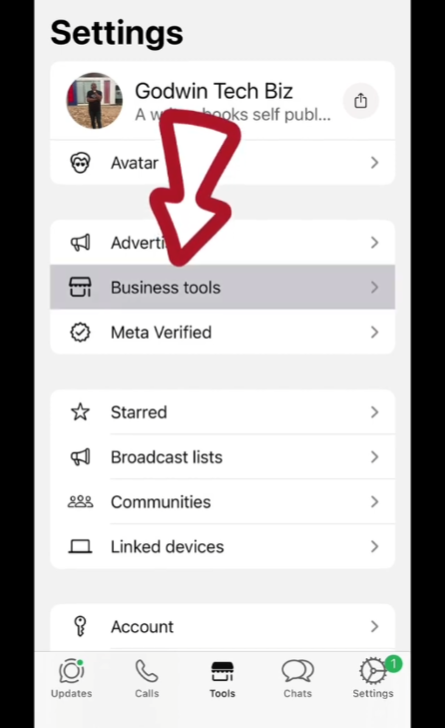
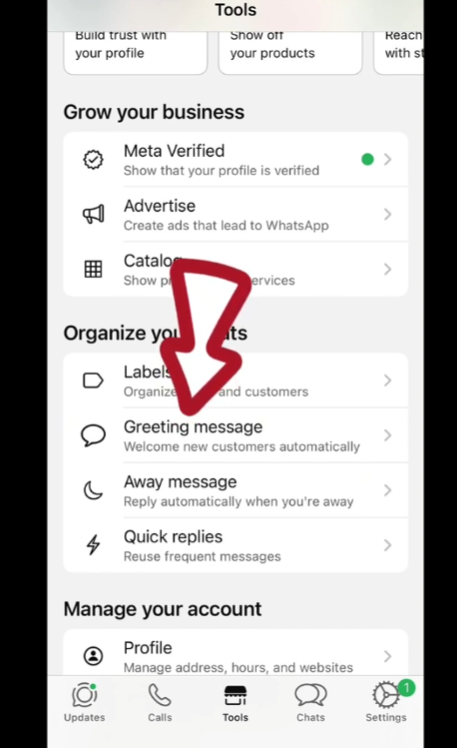
1. Open the Auto-Reply Feature
Launch JT WhatsApp and open the menu. Find settings related to tools, features, or auto-responders. The specific name may vary depending on the version.
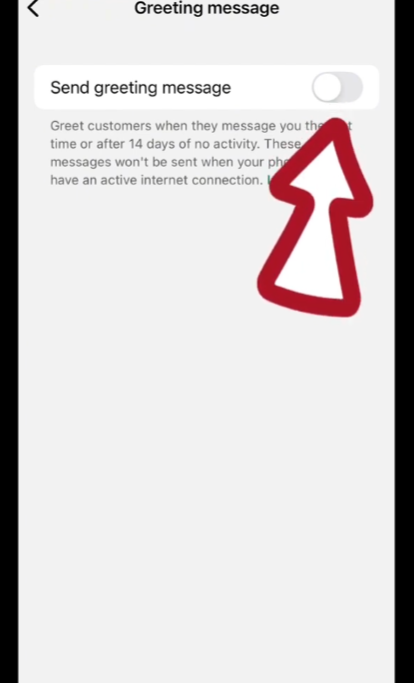
2. Turn On Auto-Reply
Enable the auto-reply option. Once it is on, you can start setting rules for how replies should work.
3. Write Your Message
Enter the message you want to send automatically. Keep it short and clear. For example:
“Hi, I’m busy right now. I’ll reply later.”
4. Choose Who Receives It
You can decide who gets the auto-reply:
- Everyone
- Only contacts
- Specific people
- Exclude certain contacts
This helps you avoid sending auto-replies where they are not needed.
5. Set Keywords
Some versions allow keyword-based replies. For example:
- If someone types “price” → send a pricing message
- If someone types “hello” → send a greeting
This makes replies more targeted.
6. Set Time Rules
You can choose when auto-replies are active:
- Always on
- Only at night
- Only during work hours
This keeps replies relevant to your schedule.
7. Save and Test
Save your settings and test the feature. You can ask a friend to send a message and check if the auto-reply works as expected.
Tips for Better Auto-Replies
A good auto-response should be concise and natural. They are not meant to replace real conversations, but rather to provide quick and effective help when you are unable to reply.
Make sure your information is clear and concise. Lengthy information can feel overwhelming and is often not read carefully. A short reply like “I’m busy right now, I’ll get back to you later” is appropriate in most cases.
Setting the right tone is also important. When chatting with friends, you can use a relaxed and casual tone, especially if you are using apps like JTWhatsApp mod 2026 to stay connected in a more personal way. In work or business settings, a more polite and neutral tone should be used. Adjusting your tone according to different situations will make your replies sound more sincere and help create better communication.
Another useful tip is to inform them of the approximate response time. For example, saying “I’ll get back to you in a few hours” or “I’ll get back to you tomorrow” lets the other person know exactly when to reply. This helps reduce the number of duplicate messages sent.
You can also create different messages for different situations. For example:
- One message for work hours
- One for late night
- One for weekends
This makes your auto-replies feel less generic and more thoughtful.
If your app supports keyword replies, try using them. This way, you can send more specific answers. For example, if someone asks about “price” or “time,” they can quickly get a response without having to wait.
It’s also a good habit to check your auto-responders regularly. Your schedule or needs may change, so updating information ensures its accuracy.
Finally, avoid making your automated replies sound overly formal or mechanical. A concise and friendly message is usually the best choice. The goal is to provide helpful assistance while maintaining smooth and convenient communication.
Things to Check If It Doesn’t Work
If your JT WhatsApp auto-reply function is not working properly, it is usually due to some minor settings or permission issues. Before making any major changes, it is recommended that you perform some basic checks.
Please ensure that the automatic reply function is enabled. Sometimes the settings have been saved, but the switch remains off. Please open the toolbar and confirm that the function is enabled.
Next, check your messaging rules. If you set specific contact or keyword filters, the auto-reply function will only work if these conditions are met. For example, if you restrict replies to specific contacts, others will not receive any replies.
Setting the inspection time is also important. If the auto-reply function is set to only be active during a specific time period, you will not receive a reply during other time periods. Many users overlook this and mistakenly believe that the feature is broken.
Another point is app permissions. JT WhatsApp requires permission to run in the background. If the system blocks background activities or the power-saving settings are too strict, the auto-reply function may not trigger properly.
You should also check if the app is updated. The older version may have some minor issues, such as affecting features like auto-reply. Updating to a newer version usually resolves these issues. Restart the app or your phone. This simple step refreshes the system and restores the function to normal without any further action.
Final Thoughts
Automatic replies are not only convenient, but also related to how you manage your daily communication. If used properly, it can help you clearly set expectations, letting the other party know when to wait and when to expect a response.
Regularly adjusting the automatic replies is also very important. Your schedule may change, and the auto-responders that worked last month may no longer suit your current habits. Keeping your responses updated will make them more accurate and natural.
Another point is to maintain a good balance. While automated replies are useful, they should not completely replace real communication. Replying in person when you have time remains crucial, especially in important or meaningful conversations.
WhatsApp’s auto-responder is just a tool. Its usability depends on how you set it up and how you use it in your daily life.