JT WhatsApp is a popular modified version of WhatsApp. It is loved by users because it offers some extra features, such as more comprehensive privacy settings and custom themes. Many people using the JT WhatsApp latest version still encounter a common problem: media file size limitations. The app will usually block you if you try to send a high-quality podcast, a long recording, or a music album that is over 100MB. Fortunately, there are some simple ways to bypass this limitation.
Method 1: Change the Media Upload Limit in JT WhatsApp Settings
One of the biggest advantages of JT WhatsApp is that it has a built-in setting to increase media sharing limits. You don’t always need third-party tools.
Open JT WhatsApp on your phone.
Tap the three dots in the top right corner to open the menu.
Go to JTMods.
Look for the Universal section and tap it.
Select Settings.
Scroll down until you see the option for Increase Media Share Limit or Audio Size Limit.
Move the slider to increase the limit up to 100MB or more.
Note: Even with this increased limit, network stability remains crucial. If your internet connection is slow, sending very large files directly via chat may still fail or take too long.
Method 2: Send the Audio as a Document
If the problem persists after changing the settings, or if the file is still too large, you should stop sending it as a regular “audio” file and instead send it as a document.
When sending media as audio files, the application compresses them. When sent in document format, the application will treat it as a PDF or ZIP file, thus allowing for larger file sizes.
Open the chat of the person you want to send the file to.
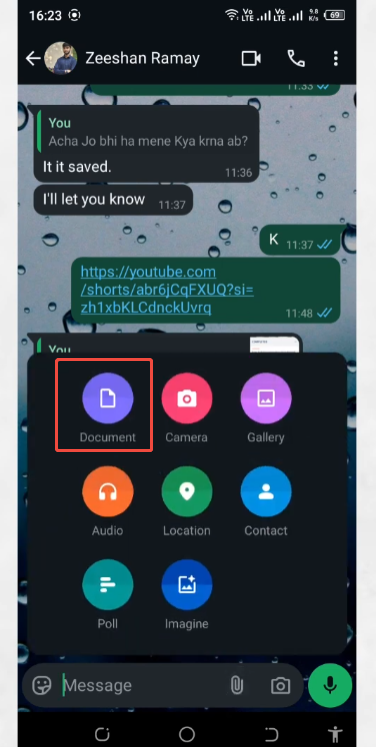
Tap the paperclip icon in the chat bar.
Do not select “Audio.” Instead, tap Document.
Browse your phone’s folders to find your large audio file.
Select the file and tap Send.
Using this method, JT WhatsApp can often handle files up to 1GB, depending on your specific app version updates.
Method 3: Use Cloud Storage Links
If your audio files are very large, or if the above methods are ineffective, cloud storage is your best option. This method is 100% reliable because you are not actually sending a file via WhatsApp, but simply sending a text link.
Popular Free Options:
Google Drive: Gives you 15GB of free space.
MEGA: Offers 20GB of free storage.
MediaFire: Great for quick uploads without complex account setups.
How to do it:
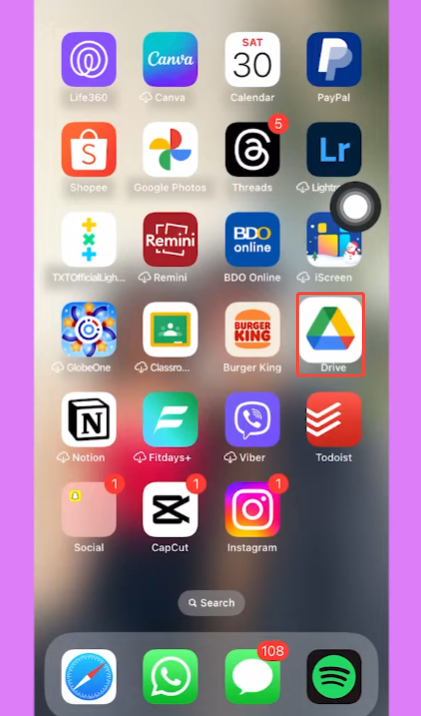
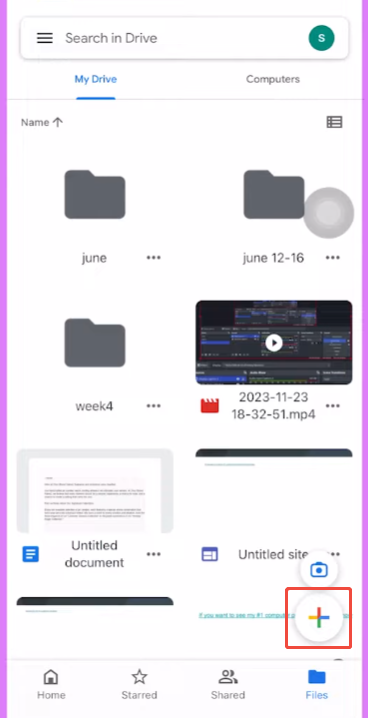
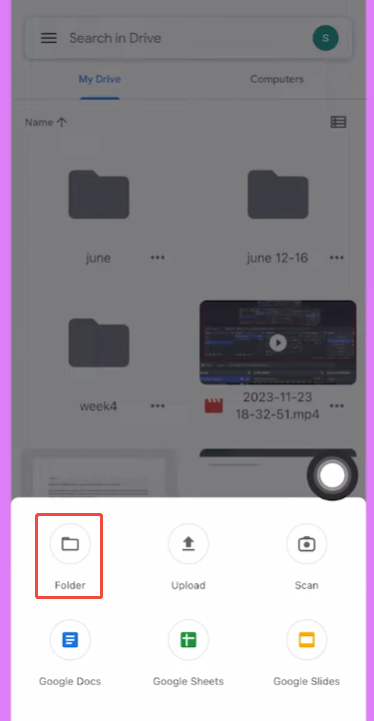
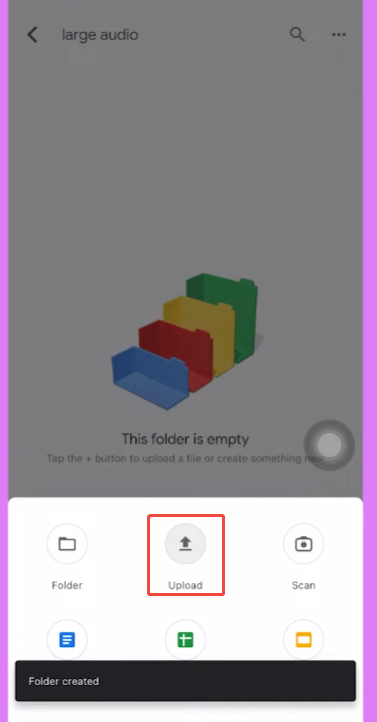
Upload your large audio file to your preferred cloud app.
Once the upload is finished, tap the options menu next to the file.
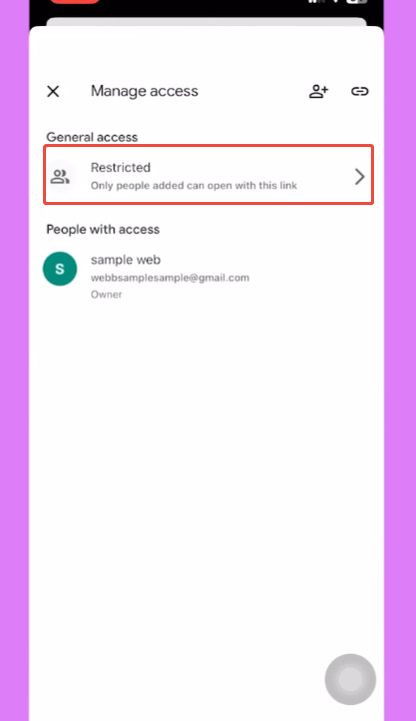
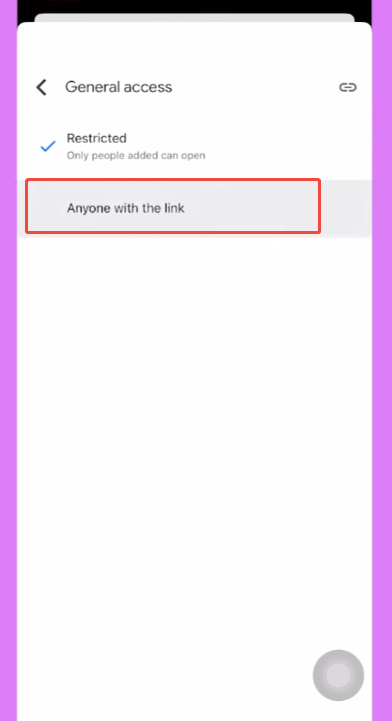
Change the link sharing settings from “Restricted” to “Anyone with the link can view/download.”
Copy the link.
Open JT WhatsApp, paste the link into your chat, and send it.
Your friend can simply click the link and download the audio file directly to their device.
Why Does WhatsApp Have These Limits?
You might wonder why modified apps like WhatsApp and JT WhatsApp have such strict limits on file size. After all, today’s mobile phones have huge storage space and faster internet speeds than ever before. Managing an app used by billions of people requires strict limitations for several reasons, including server stability, bandwidth costs, and faster message delivery across different regions and network conditions. Even users who download JTWhatsApp APK often notice that these limits help reduce crashes, prevent slow uploads, and keep the app running smoothly on both high-end and low-end devices.
1. Protecting Server Performance
Millions of people use WhatsApp to send messages, photos, and voice messages at the same time every day. Each file is first uploaded to WhatsApp’s servers before reaching the recipient, so allowing everyone to send 1GB or 2GB files constantly would quickly overload the system. This could cause delays, reduce app performance, and even lead to server instability in some regions. That is why many users search for solutions like how to send large files on JT WhatsApp, since smaller upload limits help keep the platform fast, stable, and smooth for people around the world.
2. Preventing Phone Storage Issues
Unlike computer users, most smartphone users have limited storage space. When someone sends a media file via WhatsApp, the app typically downloads it automatically to the phone’s internal storage.
Without restrictions, a few long audio files or high-definition videos could fill up a phone’s storage space within a day.
Once your phone’s memory is full, the device will slow down, apps will stop working, and you won’t be able to take new photos. Setting limits helps prevent ordinary users from running out of storage space without realizing it.
3. Saving Mobile Data and Battery
There are no unlimited high-speed internet packages. Many users around the world still have to pay for every megabyte of mobile data they use. Downloading large audio files over a mobile network can deplete a user’s monthly data limit within minutes, leading to unexpected phone bills. Uploading and downloading large files over a mobile network forces the phone’s processor to work at full capacity, which quickly drains the battery and causes the phone to overheat.
4. Spam and Security Control
Without file size limits, criminals and hackers could abuse the platform by using automated software to send massive files to thousands of random phone numbers, including manipulated media and suspicious JT WhatsApp APK audio files designed to trick users. This could not only clog the network, but also help spread dangerous software hidden inside large media content. Strict restrictions can significantly increase the difficulty for fraudsters to effectively distribute harmful content.
Important Tips for File Quality and Security
When sharing large audio files, protecting data security and maintaining clear sound quality are just as important as mastering bypass techniques. The following points should be noted:
Watch Out for Compression: When using the default audio button, WhatsApp compresses the file to save data. This may reduce the sound quality of music or professional voice-over. If you require clear audio, always use the document or cloud link.
Check Your Link Permissions: If you choose to share a Google Drive or MEGA link, be sure to set the permissions to “Anyone who owns the link can view it”. If you forget this step, the recipient will have to request your permission via email, which will cause unnecessary delays.
Delete Files from the Cloud After Sharing: To protect your privacy, especially when the audio contains personal information or private conversations, it’s best to get into the habit of deleting the file from cloud storage or removing the link once the other party has successfully downloaded it.
Beware of Fake JT WhatsApp Updates: The modified app cannot be updated through the official Google Play Store. If you need to update the application for more robust file-sharing features, be sure to download the APK file only from trusted, reputable websites to avoid malware infection.