Many people use JT WhatsApp because it offers more granular privacy controls compared to the standard version. A common goal for users is to remain “invisible” while still being able to read messages and use the application normally. This does not mean disappearing completely, but rather limiting the information others can see about your activities, such as your online status, last seen, or read receipts. By adjusting these settings carefully, users can create a more private messaging experience, similar to using a WhatsApp offline chat trick, where they stay connected without constantly signaling their presence to others.
In this guide, we’ll go into detail about some key settings and simple usage tips to help you stay discreet and minimize your exposure on JT WhatsApp.
What “Invisible” Means on JT WhatsApp
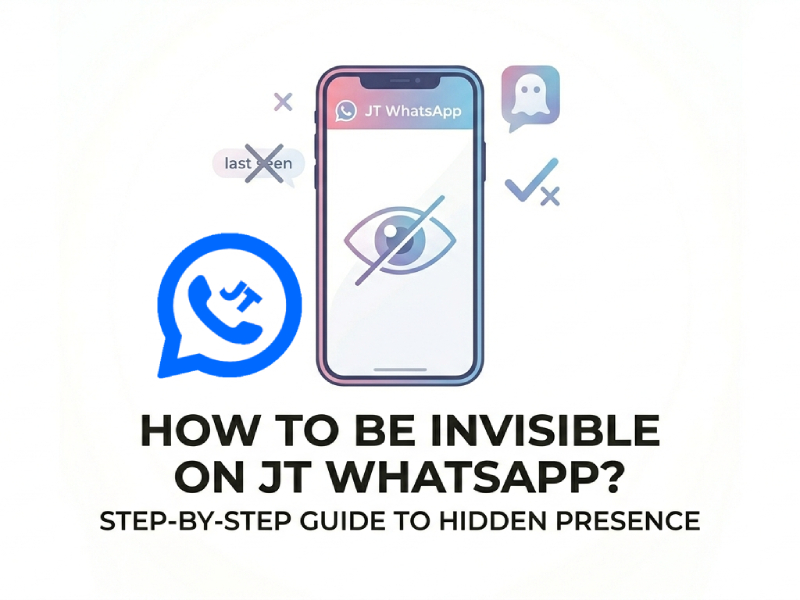
Before changing any settings, it’s best to have a clear understanding of what “invisibility” actually means in everyday use. It doesn’t mean your account disappears or that people can’t reach you; instead, it’s about managing what others can see about your activity, such as your online status, last seen, or read receipts. When learning how to be invisible on JT WhatsApp, the focus should be on adjusting privacy options to stay low-profile while still using the app normally and keeping full control over your interactions.
For most users, being invisible includes several small but useful changes:
- No online status: Others cannot see when you open the app or stay active in chats.
- Hidden last seen: Your last active time is not visible, so people cannot track when you were last online.
- No blue ticks: You can read messages without confirming that you have seen them.
- No typing or recording signs: Others will not know when you are writing or sending a voice message.
- Private status viewing: You can watch others’ status updates without your name appearing in the viewer list.
In short, the core of “stealth” mode lies in reducing the amount of signal emitted. Typically, when you’re online, reading messages, or starting to type, various applications display numerous subtle prompts that reveal your activity status. JT WhatsApp offers you the option to turn off these signals.
Hide Online Status
One of the first features people notice when using JT WhatsApp is the prominent “Online” tab. This tag appears whenever you open the app or enter a chat interface, which often makes the other person expect you to reply quickly. If you crave more personal space and hope to alleviate this invisible pressure, then hiding your online status is undoubtedly a very practical option.
To enable this feature, simply go to the “Settings” menu in JT WhatsApp, then find and open the “Privacy” or “Mods” section. Here you can find specific options for hiding your online status. Once this feature is enabled, other users will not be able to tell whether you are currently actively using the app.
Understanding the specific working mechanism of this function in daily use is also very helpful. Even if you open a chat window, browse through historical messages, or switch between different conversations, your status will still not appear as “online” to others. This feature allows you to quietly read and manage various messages.
To achieve a more effective stealth effect, you can also avoid actions that are likely to attract attention, such as frequently and quickly entering and exiting the chat interface or replying immediately after the other party sends a message. By using the app with a more unhurried and relaxed approach, you can ensure your “invisible mode” appears entirely natural and completely seamless.
Turn Off Last Seen
“Last seen” shows the last time you were active on JT WhatsApp. For many users, this small detail can create pressure to reply quickly. Turning it off gives you more space and control over your time.
To change this setting:
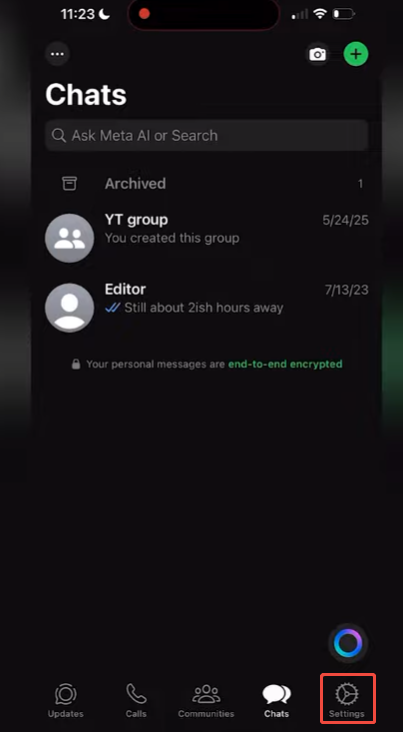
- Open JT WhatsApp
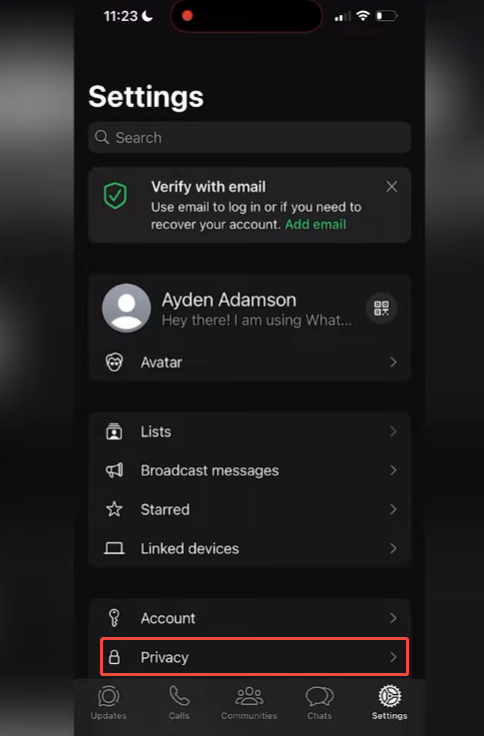
- Go to Settings
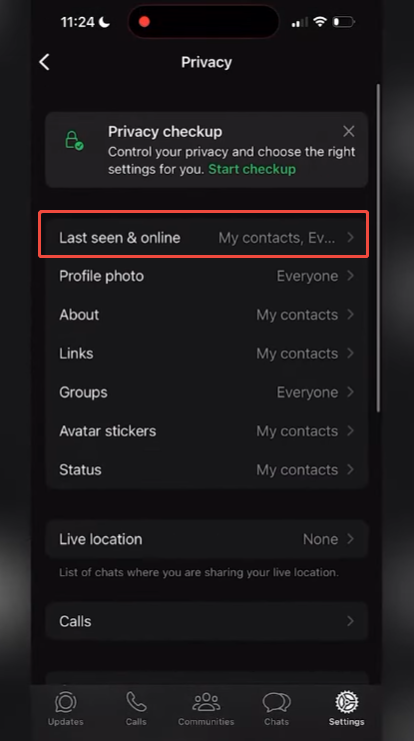
- Tap on Privacy
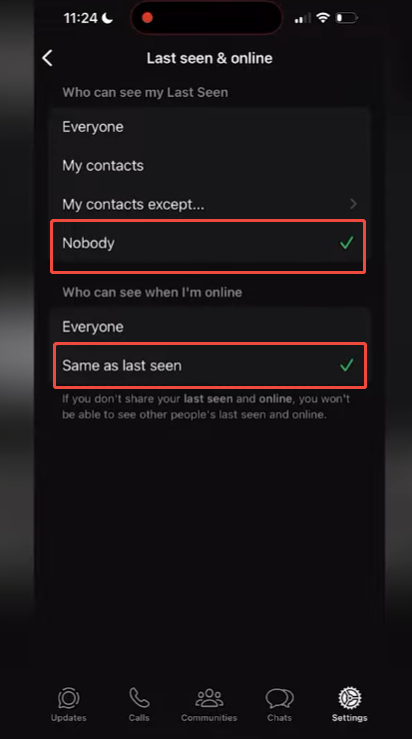
- Find “Last Seen”
- Choose “Nobody” or a limited option if available
After turning this feature off, other people will not be able to see when you last logged in. This helps you read and reply to messages when you are ready, thus avoiding the feeling of being watched.
JT WhatsApp may also offer more options, such as showing your “last online” time only to specific contacts. For those who want an extra layer of control over their visibility, using the Freeze Last Seen on JTWhatsApp feature can help you stay hidden from most people while remaining accessible to close friends, making it a practical choice for maintaining privacy without cutting off important connections.
Please note that privacy settings are usually bidirectional. If you hide your “last online” time, you may not be able to see other people’s online times. Therefore, please select the setting option that best suits your daily usage habits.
Disable Read Receipts
The “blue double ticks” are one of the primary reasons people feel pressured to reply immediately. Once they appear, the sender will know that you have opened and read the message. If you prefer to read messages quietly and reply later, turning off this feature will make a significant difference.
To disable read receipts in JT WhatsApp:
- Go to Settings
- Open Privacy
- Turn off “Read Receipts”
From now on, when you open a message, the sender will not see the “blue double ticks” marker. This way, you can view the chat content without feeling pressured to reply immediately.
Hide Typing and Recording Status
JT WhatsApp offers you the option to turn off these two notifications, giving you greater control over how your activity appears to others. After disabling it, you can freely type text or record voice without sending any real-time activity signals to the other party, which is especially useful for maintaining privacy during conversations. This improvement is part of the broader JTWhatsApp Anti-Ban privacy update 2026, designed to enhance user security while keeping the messaging experience smooth and discreet.
To set this up:
- Open JT WhatsApp
- Go to Settings or Mods
- Enter the Privacy section
- Turn off “Typing Status”
- Turn off “Recording Status”
Once these options are off, your activity stays private. You can take your time to think about what to say, edit your message, or even decide not to send it at all.
View Status Updates Secretly
Many users want to view status updates without letting others know. JT WhatsApp achieves this feature with a simple setup, but there are a few details you need to know to ensure it works smoothly.
Please go to the “Privacy” or “Module Settings” menu and enable the option to hide your browsing history. Once this feature is enabled, you can open and view other people’s statuses as usual, but your name will not appear in their visitor list.
If you frequently check status updates, you might want to combine this feature with other privacy settings, such as hiding “online status” and “read receipts.” This creates a more coherent and consistent “invisible” experience, making your movements more difficult to track.
Freeze Last Seen
If you want to keep a low profile, “freeze your last online time” is one of the most useful features in JT WhatsApp. Unlike completely disabling “Last Online Time,” this option allows you to lock it to a fixed time. To others, it will appear as if you have never opened the app since that moment, even if you are actually using it actively.
To use this feature:
- Go to Privacy or Mods settings
- Find “Freeze Last Seen”
- Turn it on
Once enabled, your last seen will stay the same until you turn the feature off. You can chat, read messages, and even browse status updates without changing that visible time.
Extra Tips for Staying Low-Key
Settings alone are helpful, but small habits also make a difference.
- Avoid opening chats right after receiving messages
- Use notification preview to read messages without opening the app
- Reply at different times instead of instantly
- Keep your app updated to make sure features work well
These habits help you stay less noticeable during daily use.
Things to Keep in Mind
While enabling the “invisible” function may make you feel more relaxed and comfortable, it may also change how others interpret your behavior. When others cannot see your online status, last online time, or read receipts, they are often confused as to whether you have read their messages. This situation can sometimes even lead to misunderstandings.
Even if you want to keep your online activity private, using tools like JT WhatsApp APK download can help manage read receipts, but it’s important to remember that if you have read a message but do not reply for a long time, the other person may mistakenly think that you are deliberately ignoring them. If you have a history of responding quickly, the chances of this misunderstanding occurring are even higher. Therefore, even if you enable privacy settings, you should try to maintain consistency in your reply habits.
Enabling too many privacy settings simultaneously can make your account appear to be in a “dormant” state. If you still want to maintain smooth daily communication with friends, you might want to keep some features enabled, for example, displaying “typing” status or enabling read receipts for specific conversations.