JT WhatsApp offers a wealth of personalization options to customize the chat interface. Beyond changing colors, fonts, and icons, users can also edit WhatsApp backgrounds to adjust the chat background and apply various themes for a more personalized interface. Dynamic themes and wallpapers can make conversations more lively, while simple background changes help users create a chat atmosphere that matches their personal preferences.
Unlike regular WhatsApp, mods like JT WhatsApp let you really make the app your own—think cool wallpapers, custom chat bubbles, and all sorts of tweaks to match your vibe.
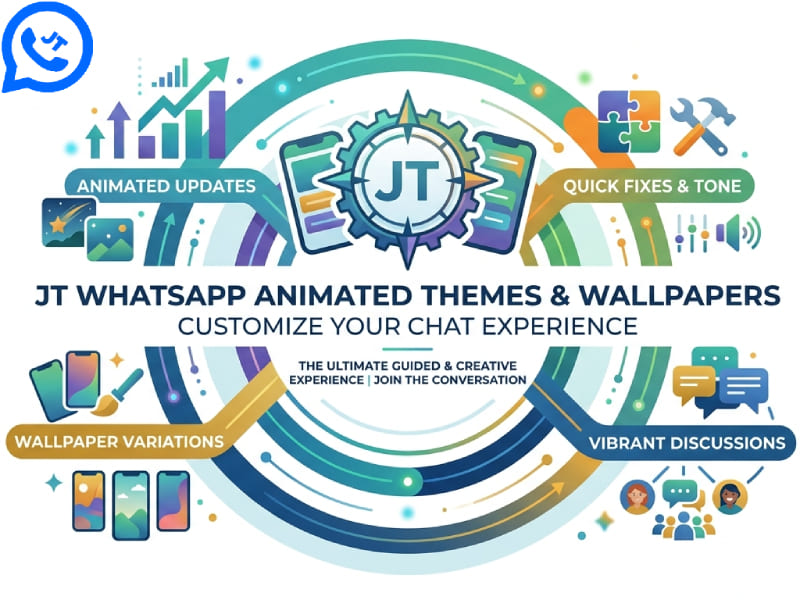
What Are Animated Themes in JT WhatsApp
Dynamic themes are basically WhatsApp skins that come alive—think smooth color shifts, subtle animations, or interactive touches that make your chats feel way more lively than a plain static background.
They’re super popular with folks who’ve had enough of WhatsApp’s default look and want something fresh and fun. For instance, you might pick a sleek dark theme with gentle glow effects for late-night texting, or go bold with a bright, playful theme to spice up your chats.
Common tweaks include:
– Animated backgrounds (like slow-moving gradients or soft particle effects)
– Custom chat colors that match your mood or style
– Personalized icons (for status, calls, or even your profile pic)
– Stylish message bubbles—rounded, glassy, or even with tiny shadows
– Fresh menu designs (sliding, fading, or icon-only)
– Matching chat wallpapers that tie everything together
Mix and match any of these, and boom—you’ve got a WhatsApp that truly feels like yours.
Core Features of Animated Themes and Panoramic Wallpapers
JT WhatsApp’s dynamic themes and panoramic wallpapers are more than just simple background changes; they give users greater autonomy to customize the look of the chat interface and the combination of various visual elements. Users are not limited to a single static image, but can choose designs that include dynamic effects, wide layouts, and harmonious color schemes to create a more cohesive chat style.
1. Better Theme and Wallpaper Matching
You can use dynamic themes and wallpapers along with other personalization options. For instance, try pairing a dark theme with a wide, dark wallpaper. If you prefer a brighter look, match a light wallpaper with a lighter chat color scheme and bubble style.
Coordinating these elements helps avoid a cluttered visual effect and ensures that the wallpaper, text, speech bubbles, and menu colors maintain a consistent style.
2. Custom Image Support
One of the highlights of the wallpaper customization feature is that you can switch to your own picture when the existing design does not suit your taste. Users can select photos from their devices and set them as chat backgrounds, depending on the options offered by their JT WhatsApp version.
Whether it’s personal photos, travel snapshots, artwork, or landscape pictures, they can all bring a refreshing visual effect to the chat interface. Wide-format images are particularly well-suited for panoramic wallpaper styles because they fill the available space more naturally.
3. Different Styles for Different Chats
Personalization doesn’t have to be limited to using the same wallpaper for all conversations. If the JT WhatsApp version you are using supports setting backgrounds for different chats, you can choose different designs for different conversations.
For example, you can choose a minimalist background for important conversations, and a colorful, animated design for casual chats. This makes each dialogue more unique while maintaining the overall personalized style of the interface.
4. Theme Details Beyond the Wallpaper
The changes brought about by dynamic themes are not limited to the background. Depending on the theme, it may also include matching color schemes, icons, buttons, menus, and message bubbles.
This is why choosing a complete theme can significantly alter the visual effect compared to simply changing the wallpaper. Users can first choose their favorite theme, and then fine-tune the various elements within it to create a more natural style.
5. Easy Theme Switching
Trying out different designs is one of the great joys of a customized experience. Users may want different looks during the day and at night, or simply want to change their wallpaper for a fresh experience.
Thanks to the convenient theme and wallpaper settings, users can try out various combinations, including options to change the WhatsApp home screen wallpaper and switch between them at any time without changing their usual WhatsApp habits. Whenever the current design starts to feel monotonous, users can easily refresh the interface.
How to Change Background in WhatsApp
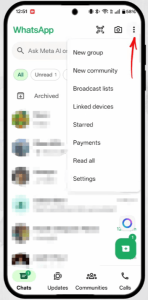
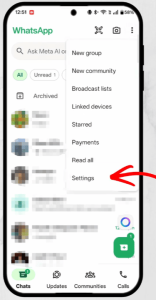
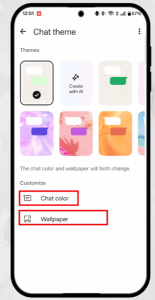
Changing the chat background is one of the simplest ways to personalize your messaging experience. JT WhatsApp typically offers a wallpaper setting feature, allowing users to choose images, colors, or other available designs.
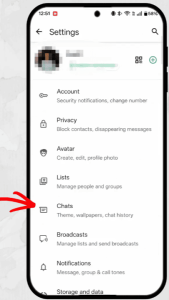
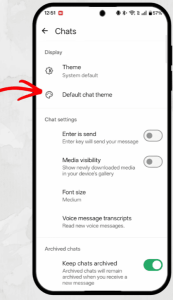
Follow these general steps:
- Open JT WhatsApp on your device.
- Go to the settings menu.
- Find the chat customization or wallpaper option.
- Select the background settings.
- Choose a wallpaper from the available options or use an image from your gallery.
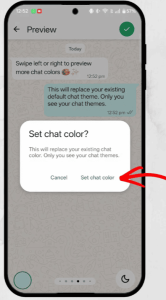
- Adjust the wallpaper settings and save the changes.
After completing these steps, the selected background will be displayed in your chat interface. Some settings also allow users to apply different wallpapers to specific conversations, instead of having to use the same design for all chats.
Customize JT WhatsApp Chat Bubbles and Colors
Wallpaper is just one part of the personalization options. JT WhatsApp themes may also include settings for chat bubbles, text colors, and other visual details.
Changing these elements can help create a complete design style. For example:
- A dark wallpaper can be combined with light message bubbles.
- A colorful theme can use matching text colors.
- A simple background can work well with creative chat bubble designs.
A balanced combination of colors and styles can make conversations easier to read while keeping the interface attractive.
Create Different Styles with Theme Combinations
One of the major advantages of customization is that users can combine different settings without being limited to a single theme. Wallpapers, font styles, chat colors, and icon designs can be combined to create a cohesive visual style.
Some popular theme ideas include:
- Minimal Style
Wallpapers with simple colors and minimalist designs can create a comfortable reading experience.
-
Dark Style
The dark background paired with matching elements is very popular with users who prefer a modern style.
-
Colorful Style
Bright wallpapers and creative themes can make the app look more energetic.
-
Seasonal Style
Users can change themes based on events, seasons, or personal celebrations.
How to Choose the Best Wallpaper for Your Chats
Good wallpapers should not only be aesthetically pleasing, but also ensure that the information is easy to read. Some designs may look good at first glance, but they can be distracting during long conversations.
When selecting a wallpaper, consider:
- Color balance
- Text visibility
- Image quality
- Personal preference
- Overall theme matching
Simple patterns, soft colors, and clear images are often popular because they keep conversations comfortable.
Save and Switch Between Different Themes
Many users who enjoy personalization like to try out different designs regularly. Saving a few favorite themes allows you to easily change their appearance anytime.
For example, users can prepare:
- A professional style for work conversations
- A relaxing style for personal chats
- A special theme for holidays
- A creative design for daily use
Switching between different styles helps keep the messaging experience fresh.
Personalize Your JT WhatsApp Experience
Themes and wallpapers may seem like minor details, but they can significantly change the look and feel of an application in daily use. JT WhatsApp offers a wealth of customization options, allowing users to adjust the appearance of the chat interface to their liking, from dynamic backgrounds and color schemes to chat interface design and a personalized wallpaper WhatsApp chat background.
Whether users prefer a minimalist layout or a more creative visual style, choosing the right theme can make the chat experience more personalized. By experimenting with various wallpapers, themes, and visual settings, users can create a WhatsApp interface that truly reflects their own style.