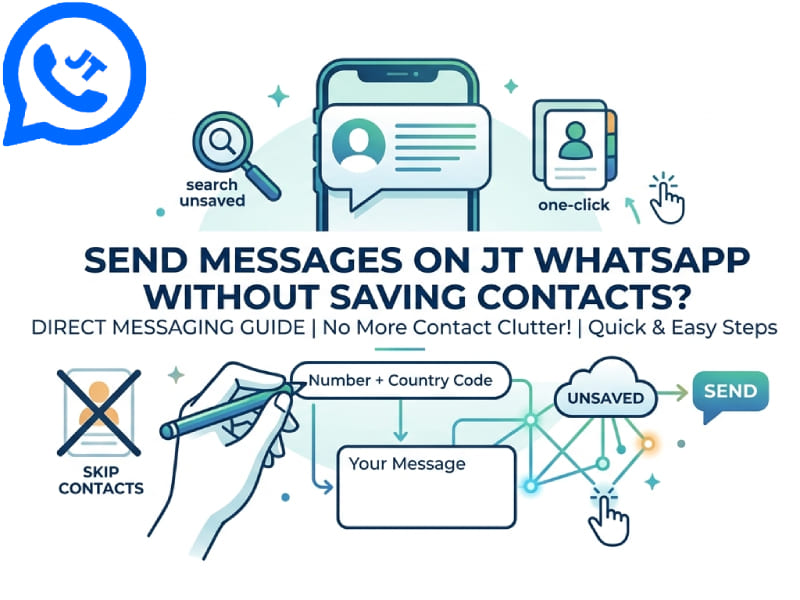
Many people use JT WhatsApp for better chat management, themes, and privacy options. A common need is to contact someone without adding their number to the phone book. The whatsapp without saving number feature is useful when messaging strangers, delivery drivers, or online sellers without filling your contacts with temporary numbers.
If you want to know about setting up intelligent auto-replies in JT WhatsApp, you can refer to our previous article. This guide will introduce various methods for sending messages on JT WhatsApp without having to save contacts in advance, and share some related tips to make the process even faster.
Why People Want to Skip Saving Contacts
Before going into the specific steps, it would be helpful to understand why this feature is so important to so many users.
- Phone book stays clean. Nobody wants a contact list full of one-time numbers from marketplace sellers or random calls.
- Faster messaging. Adding a contact takes extra steps: opening the phone app, typing a name, saving, then switching back to WhatsApp. Skipping this saves time.
- Some people prefer not to store a stranger’s number permanently, especially after a single transaction or conversation.
- Business use. Small business owners who talk to many customers a day don’t want hundreds of names cluttering their contact list.
JT WhatsApp, as a modified version of the original app, includes some small and convenient features that make the operation smoother than the standard app.
Method 1: Using the Built-In Number Search
Like the standard WhatsApp, JT WhatsApp allows you to directly search for numbers that have appeared in chats, groups, or shared links. However, this feature alone will not work for brand new numbers—you will need to use one of the methods mentioned below to learn how to whatsapp without saving number and open the chat window without adding the contact to your phonebook.
Method 2: Send a Message Using a WhatsApp Link
This is the most reliable and widely used method. WhatsApp (and JT WhatsApp) supports a link format that allows you to open a chat window with a number simply by clicking it, regardless of whether the number has been saved.
Steps:
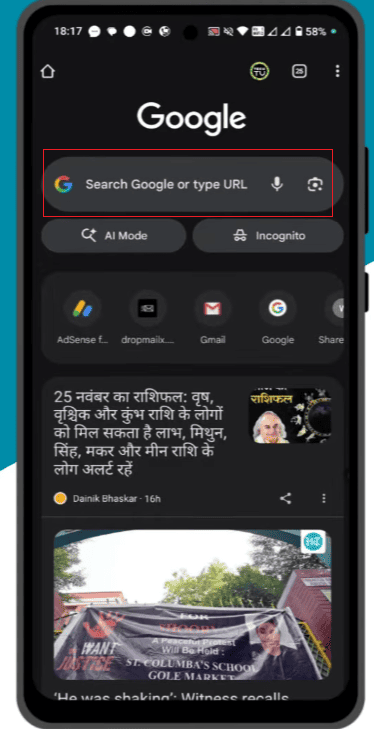
- Open your phone’s browser or a notes app.
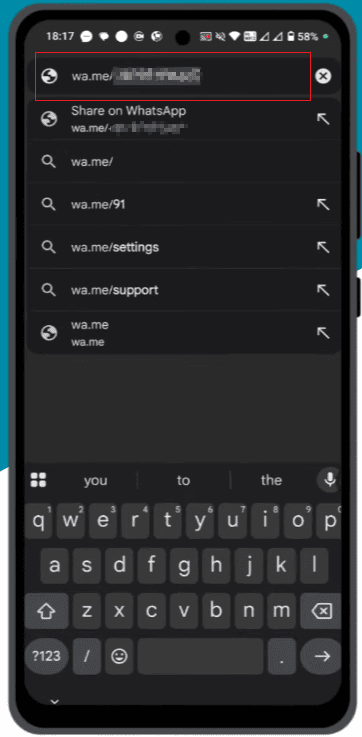
- Type the link in this format: https://wa.me/[fullnumber], replacing [fullnumber]with the country code and number, with no plus sign, spaces, or dashes.
- Tap the link.
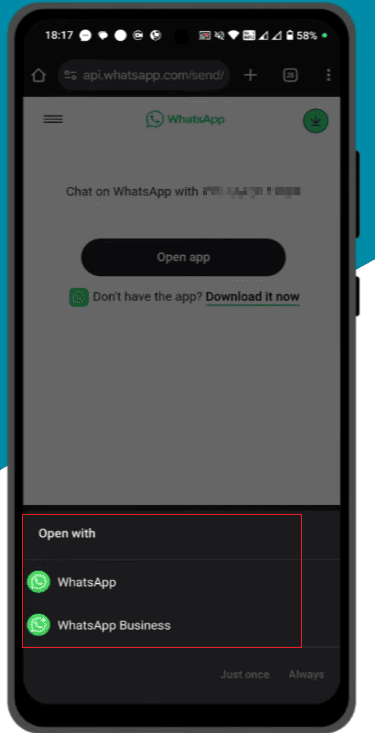
- Your phone will ask which app to open it with. Choose JT WhatsApp.
- A chat window opens with that number, ready for you to type and send a message.
This method still works even if the number has never sent you a message or is not in your contact list.
Method 3: Use the QR Code Scanner
If the other person is nearby, JT WhatsApp’s QR scanner is a quick way to start a chat.
- Open JT WhatsApp and go to the three-dot menu or settings icon.
- Look for “Scan QR code” or a similar option.
- Ask the other person to open their own QR code from their WhatsApp profile settings.
- Scan it with your camera.
- A chat window will open directly, no saving required.
This works well at events, meetings, or any situation where two people are in the same place and want to exchange a message quickly.
Method 4: Use a Third-Party Link Generator
Many free websites can generate clickable WhatsApp chat links based on the number you enter. Simply paste your number, and the website will generate a link. Click the link to start a chat. This works on the same principle as “Method 2” but is highly convenient for those who prefer not to manually type out the link every time.
Some of these tools also support preset message content; this way, when you open the chat window, the message box is already filled with preset text, and you can send it with just a click.
Method 5: Temporary Chat Feature in JT WhatsApp
Some versions of JT WhatsApp include settings for temporary or “quick chat” windows; these windows close automatically and clear their content when you exit, and do not create permanent contact entries. If your version offers this feature in Settings > Chat (or a similar menu), you can have brief, instant conversations without saving the other person to your contact list and leaving no trace.
Not all versions of JT WhatsApp include this option (as modified apps vary by developer and version), so please check your settings menu to confirm the specific features available.
How to Add Number in WhatsApp Group Without Save
Sometimes, the goal isn’t to have a one-on-one chat, but simply to add the number directly to a group—again, without needing to save it as a contact first. This is a common practice for administrators managing large groups, such as class groups, work teams, or community groups with frequent member changes. For those who need sending whatsapp without saving number, this method provides a faster way to add new members while keeping contact lists organized and avoiding unnecessary saved entries.
Here’s how it’s done on JT WhatsApp:
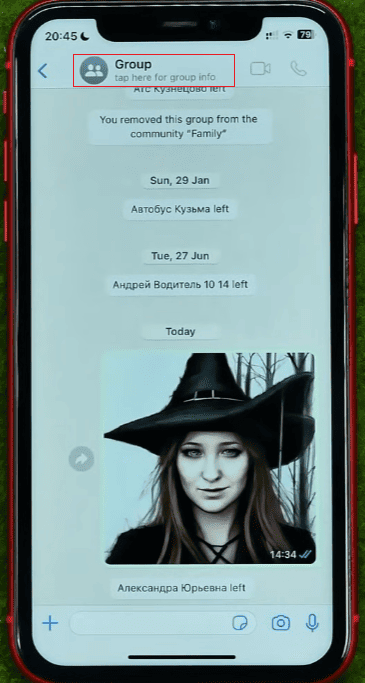
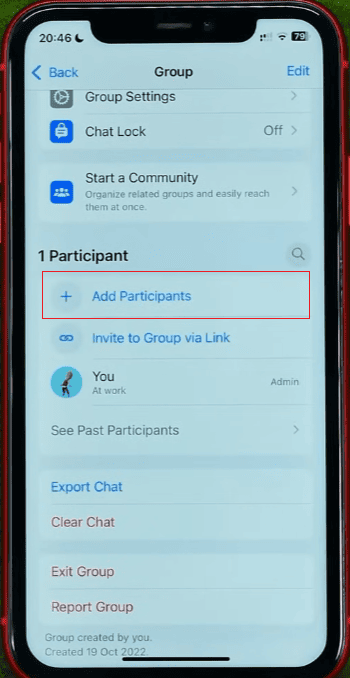
- Open the group you want to add the number to.
- Tap the group name at the top to open group settings.
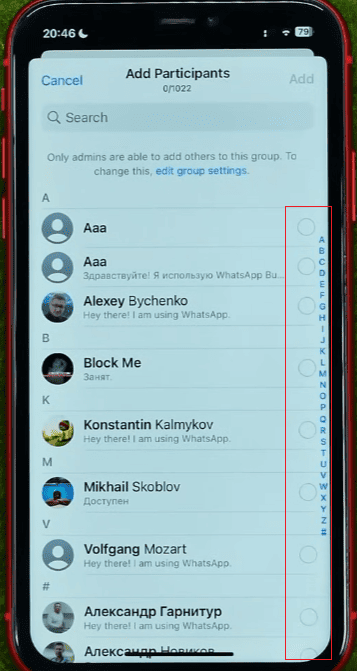
- Select “Add Participants” or the “+” icon.
- Instead of scrolling your contact list, look for an option to enter a number manually. On many JT WhatsApp builds, typing a number directly into the search bar of the add-participant screen will locate that number even if it isn’t saved, as long as it’s an active WhatsApp account.
- Tap the number once it appears, then confirm to add it to the group.
- The person receives a group invite notification and joins without you ever saving their contact.
If a manual search does not show the number, another method is to send the person a group invitation link. You can generate this link by opening the group settings and selecting “Invite via Link,” then use method 2 above (wa.me link) to send the link to that number. They can join the group with just one click of a link.
Common Issues and How to Handle Them
1. The link doesn’t open JT WhatsApp automatically. Please ensure that JT WhatsApp is set as the default app for handling WhatsApp-related links, or manually select it when prompted to choose an app.
2. The number doesn’t appear in group search. This usually means the number is not registered on WhatsApp, its privacy settings prevent it from being found through a search, or the country code entered is incorrect. Please carefully check the complete number format, including the country code.
3. Message doesn’t send after opening the chat. Sometimes, even though the chat window is open, the send button will remain grayed out and unavailable if the number format is incorrect. Please double-check the number and try the link again.
QR scan doesn’t recognize the code. Please ensure that you have granted your phone’s camera permission to JT WhatsApp and that there is sufficient lighting for a clear scan.
A Few Extra Tips
- Keep a simple text file or notes app list of numbers you message often without saving them, so you can copy and paste the wa.me link quickly instead of retyping it every time.
- When messaging a new number for business purposes, a short introduction in the first message helps the other person understand who is contacting them, since your name won’t show unless you’ve set a WhatsApp display name.
- If you plan to message the same unsaved number often, consider whether saving it under a simple label like a first name or a short tag might actually save more time than repeating these steps daily.
Wrapping Up
Once you master these quick methods, sending messages on JT WhatsApp without saving contacts becomes incredibly easy. The wa.me link method works in almost any scenario, the QR code scanning feature is perfect for face-to-face interactions, and searching for numbers directly when adding people to groups allows you to bypass your address book entirely. Whether you’re chatting one-on-one or managing busy groups, developing these little habits can keep your contact list tidy and improve communication efficiency.