If you’ve joined multiple groups on JT WhatsApp, especially in the JT WhatsApp latest version, you may find it difficult to distinguish important messages based solely on notification sounds. Using the same ringtone for all chats can be confusing, particularly since some groups are work-related while others are with friends or family. Customizable notification sounds let you identify the source of a message without even opening your phone, and in this article, we will explain step by step how to set a custom ringtone for your JT WhatsApp group and why doing so can enhance your messaging experience.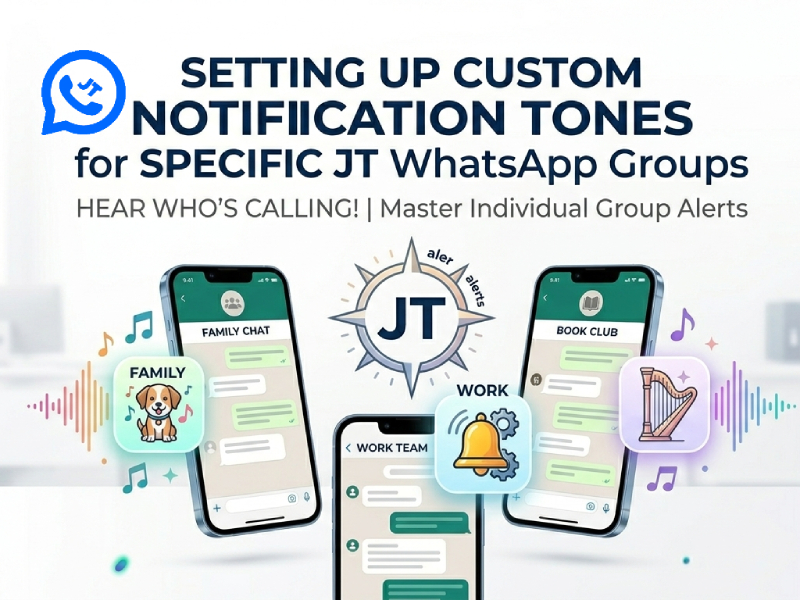
1. Why use custom notification tones
Customizing notification sounds in JT WhatsApp APK is more than just making your phone sound unique. They can also help you quickly identify messages without having to look at your phone, saving you time on busy days. For example, if you have a work group and a family group, using different notification tones can let you know immediately which group needs your attention.
They can also reduce stress. Constant notifications from multiple groups can be overwhelming, especially when all the notification tones are the same. By setting unique notification sounds for each group, you can focus on important things and ignore non-urgent messages.
Another benefit is that customizable notification sounds can make your chat experience more personalized and enjoyable. You can choose notification sounds that match the group atmosphere; for example, set a soft notification sound for close friends and a short notification sound for regular chats. This small change can make chatting smoother and reduce repetition.
Using custom notification sounds can also help you stay organized. When multiple notifications arrive simultaneously, you can immediately know which group the message came from, making it easier to respond appropriately and better plan your day.
2. How to set a custom tone for a JT WhatsApp group
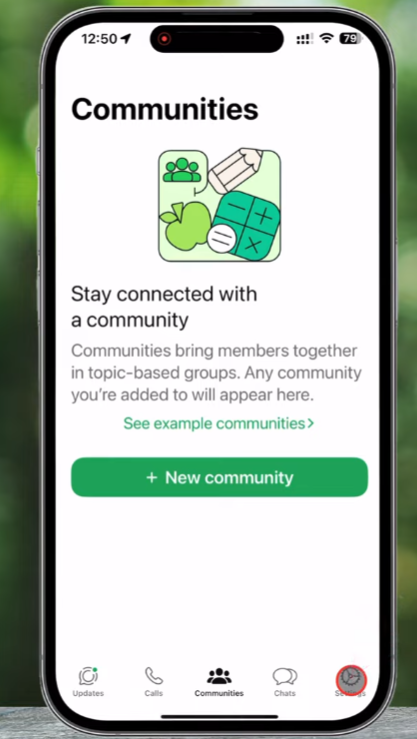
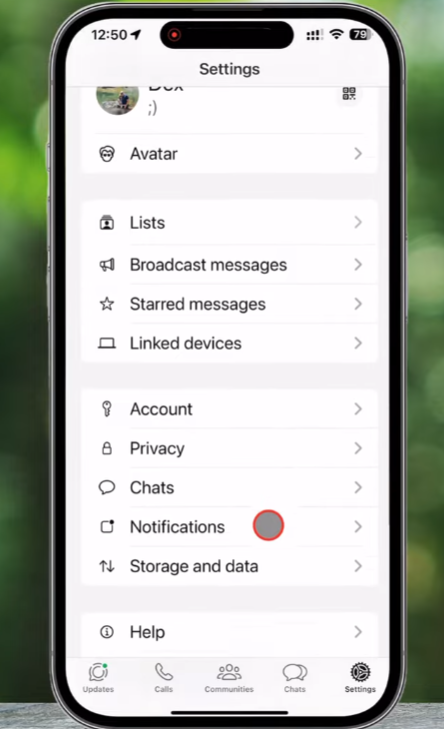
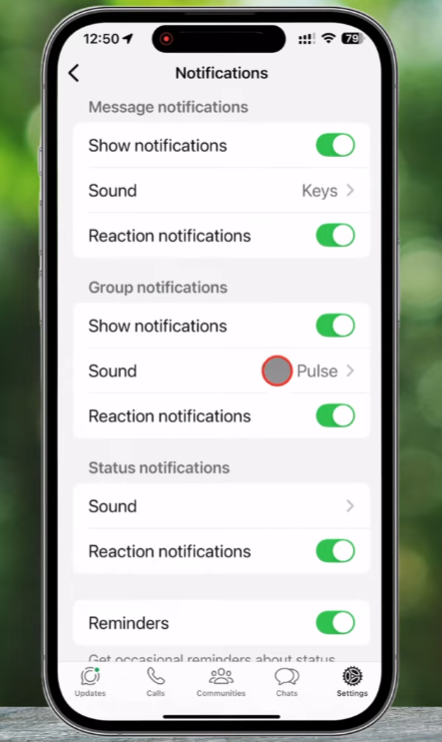
Setting a custom ringtone for a group on JT WhatsApp is simple, but a few extra steps can ensure it works exactly as you expect. Here is a detailed guide:
- Open JT WhatsApp: Make sure you are using the latest version of the app to access all notification features.
- Select the group: Find the group chat for which you want a special tone. This could be a work group, a family group, or a friends group.
- Open group settings: Tap on the group name at the top of the chat. This will take you to the group info page.
- Find “Custom Notifications”: Scroll down until you see the “Custom Notifications” option. Tap it to open the settings.
- Enable custom notifications: If it is not already turned on, switch it on. This allows you to override the default notification sound for this specific group.
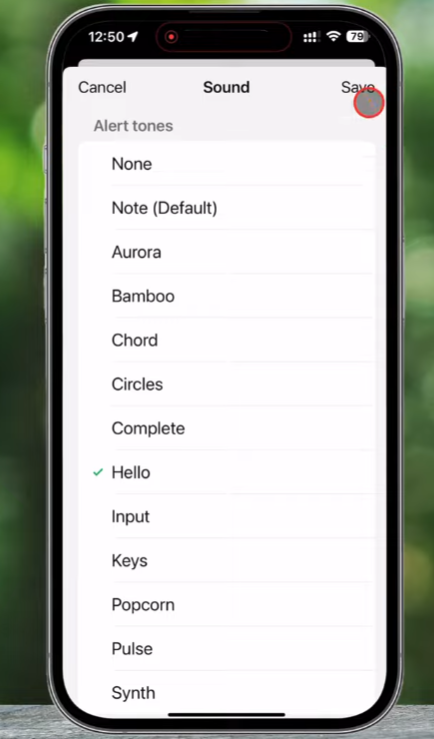
- Pick your tone: Tap on “Notification tone.” You will see a list of available tones on your phone. You can:
- Choose a tone from the default list.
- Add a tone from your music library by selecting a song or audio file.
- Test the tone before saving to make sure it’s loud enough or pleasant to your ears.
- Adjust vibration and pop-up options: Some phones also allow you to customize the vibration pattern or display pop-up notifications. Even without sound, this can help you notice important information.
- Save your changes: After selecting a notification sound, please be sure to confirm or save your selection. This notification sound will now only play when a message is received from this specific group.
Extra tips:
- If you manage multiple groups, choose a different notification sound for each type of group. For example, family groups use soft ringtones, while work groups use sharp alert sounds.
- Keep frequently active groups on short tones to avoid being annoyed by long sounds.
- If you ever want to revert to the default tone, you can disable custom notifications for that group.
By carefully setting a custom ringtone, you can instantly know which group sent the message, even without looking at your phone. This makes chatting on JT WhatsApp more organized and easier.
3. Tips for using custom tones effectively
Setting a custom notification ringtone is simple, but using it effectively requires some planning. Here are some detailed tips to help you get the most out of this feature:
- Different tones for important groups: Set louder or more unique alert sounds for information groups that require your immediate attention, such as work projects, urgent family updates, or event planning chats. This way, important information can be identified immediately, even if your phone is in your pocket.
- Short tones for frequent groups: If the group is very active and messages are sent frequently, it is recommended to choose a short and easy-to-understand notification sound. If you receive multiple messages in a short period of time, lengthy or complex notification sounds can be annoying and even disruptive.
- Match tones to type of chat: Choose the appropriate notification sound based on the atmosphere or purpose of each group. For example, you can choose a soft, soothing ringtone for family groups and a clear, prominent alert tone for work groups. Matching notification sounds to chat types helps you prioritize replies more easily.
- Silent or subtle tones for less important groups: Not every group requires your immediate attention. Setting silent or very subtle tones for casual groups reduces distractions while still allowing you to check messages when convenient.
- Use consistent patterns: Try to use a different tone of voice in all groups. For example, one tone can be used for all work-related groups, while another tone can be used for all friends or interest groups. Maintaining consistency helps you quickly identify information without having to think.
- Test your tones: Before finalizing the settings, listen carefully to each tone and imagine how you would feel hearing them in different environments. Some tones may be difficult to hear in a noisy environment or too jarring in a quiet environment. Please make the necessary adjustments based on your lifestyle.
By following these tips, you can ensure that custom notification ringtones are not only a fun feature but also a practical tool for effectively managing messages.
4. Troubleshooting common issues
Sometimes, even if you set a custom notification sound in JT WhatsApp, you may find that the sound does not play properly. A common reason is app permission issues, so if you are learning how to use JT WhatsApp, make sure to grant the app permission to send notifications in your phone settings. Without this permission, the notification sound may fail to play even if all other settings are correct.
Another common problem is battery optimization. Many mobile phones limit background activity to save power, which may cause JT WhatsApp to fail to play notification sounds. Please check your phone’s battery settings and add JT WhatsApp to the list of apps allowed to run in the background.
Using outdated versions of applications can also cause problems. If your custom notification sounds are not working properly, please try updating JT WhatsApp to the latest version. Developers typically fix notification-related bugs in new versions.
A simple phone restart can solve some minor problems. Sometimes, applications or the system may not apply changes immediately; a restart can ensure that all settings take effect correctly.
Most custom notification sound issues can usually be resolved by checking permissions, battery settings, app updates, and restarting the phone.
5. Benefits of custom notification tones
Stay organized
Custom tones make it easier to identify which group sent a message without checking your phone. By exploring JT WhatsApp hidden features, you can set unique notification sounds for each chat, helping you respond to important messages first while ignoring less pressing ones, keeping your conversations more organized and manageable.
Reduce stress
Receiving constant notifications from multiple groups can be overwhelming. By using different tones, you can filter out less important messages and focus only on what matters. This cuts distractions and helps you stay calm.
Enhance personal experience
Choose your favorite ringtone for each group to make chatting more fun. You can match your ringtone to the type of chat to create a familiar and comfortable feeling when using JT WhatsApp.
Save time
When you can determine which group a message comes from just by the notification sound, you no longer need to open every single notification. This small change can save you a day, especially if you’ve joined multiple active groups.
Improve focus
Customizable ringtones allow you to prioritize notifications. Important groups can be set to more prominent ringtones, while less urgent chats can be set to quieter ringtones. This way, you can focus on the task at the same time without missing important information.
6. Managing Multiple Group Notifications Effectively
When you are part of many JT WhatsApp groups, custom tones are only the first step. To completely manage notifications and avoid feeling overwhelmed, consider these tips:
- Prioritize groups: Decide which groups are urgent, important, or casual. Assign distinct tones to each category.
- Use vibration patterns: Some phones allow custom vibration for specific groups, adding another layer to identify messages quickly.
- Mute low-priority groups: For groups that send frequent but non-essential messages, muting them for a few hours or days can reduce stress.
- Set quiet hours: Combine custom tones with “Do Not Disturb” or scheduled quiet hours to prevent notifications from interrupting sleep or focus time.
- Regularly review groups: Periodically check which groups are still relevant. Leaving inactive or unnecessary groups can make your notifications easier to manage.
By optimizing the notification system, you can reply to important messages faster, enjoy music or other activities without interruption, and reduce the stress of constantly checking your phone. Custom ringtones work best when used in conjunction with smart notification strategies.