JT WhatsApp is a modified version of WhatsApp that offers more customization and privacy options compared to the official app. Many users choose JT WhatsApp because they want better control over their chat history, profile, and personal information.
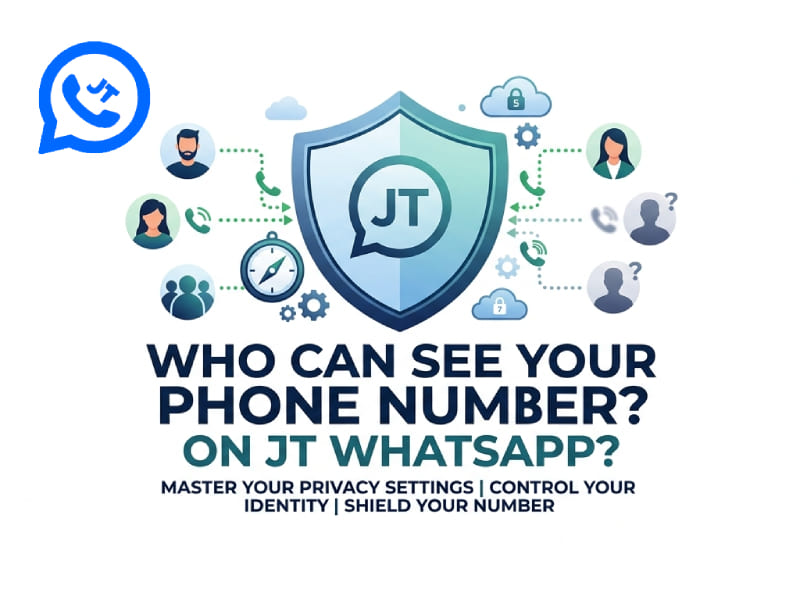
A question users frequently ask is: Who can see my phone number on JT WhatsApp? Since your WhatsApp account is linked to your phone number, understanding how your number appears to others can help you better manage your privacy settings.
In the previous guide, we explained why gamers prefer JT WhatsApp for low-latency messaging. And in this guide, we will explain JT WhatsApp’s phone number visibility mechanism, whether WhatsApp will show your real number, and how to hide your number.
Does WhatsApp give you a phone number
WhatsApp will not create a new phone number for your account. When registering for WhatsApp or JT WhatsApp, you need to create an account using your own mobile phone number.
Your mobile phone number is your account ID. Other users can use this number to find your WhatsApp account, send messages, and add you to their contacts. Unlike some other instant messaging applications that provide usernames or unique IDs, WhatsApp primarily relies on mobile phone numbers for account association.
JT WhatsApp works in the same way. You still need a valid phone number to register and use the app. The difference is that JT WhatsApp offers some additional settings that allow users to adjust how certain messages are displayed.
For example, you can control privacy options such as:
- Who can see your profile photo
- Who can view your last seen status
- Who can see your online status
- Who can add you to groups
However, your phone number remains connected to your WhatsApp account.
Who can see your phone number on JT WhatsApp
In most cases, people who have your number saved in their contacts can recognize your WhatsApp account. If you chat directly with someone, they can usually see the phone number linked to your account.
The visibility of your number depends on different situations:
1. People in your contacts
If someone saves your phone number, they can usually find your WhatsApp profile. When they open your chat history, your account information will be linked to that number.
2. People you chat with
When you send a message to someone on WhatsApp, that person can access your account details. Because WhatsApp uses phone numbers as account identifiers, your number may be displayed during conversations.
3. Group members
In WhatsApp groups, members can usually see each other’s phone numbers. This allows users to identify other members in the group.
JT WhatsApp may offer additional privacy controls, but it cannot completely replace the phone number system used by WhatsApp.
Does WhatsApp show your real phone number
Yes, WhatsApp uses your real phone number when you register your account. The number you enter during registration will become the number associated with your WhatsApp profile.
Your WhatsApp contacts may see this number, not just the username. This differs from other platforms where users communicate via usernames without sharing phone numbers.
JT WhatsApp also requires a phone number because it is based on WhatsApp’s account system. Features such as themes, message customization, and privacy tools will not change the account number associated with your profile.
Your phone number may appear in places such as:
- Your chat profile
- Group member lists
- Contact information pages
- Shared contact cards
Whether someone can view it depends on your relationship with that person and your privacy settings.
How can I hide my number in WhatsApp
WhatsApp does not offer an option to directly hide your phone number. Your number is part of your account identity, so some users may still see it when communicating with you.
However, you can adjust your privacy settings to restrict who can access your account information.
Change privacy settings
Open WhatsApp or JT WhatsApp and go to:
Settings → Privacy
From here, you can manage options such as:
- Profile photo visibility
- Last seen and online status
- About information
- Status updates
- Group invitations
These settings help reduce the amount of personal information visible to other users.
Use a username or nickname
Although your account requires a phone number, you can use a different name in your profile. This way, others won’t need to rely solely on your phone number to recognize you.
Avoid sharing your contact card
When you share a WhatsApp contact card, your phone number will be included. If you do not want others to save your number, you can choose not to share your contact information directly when sending messages.
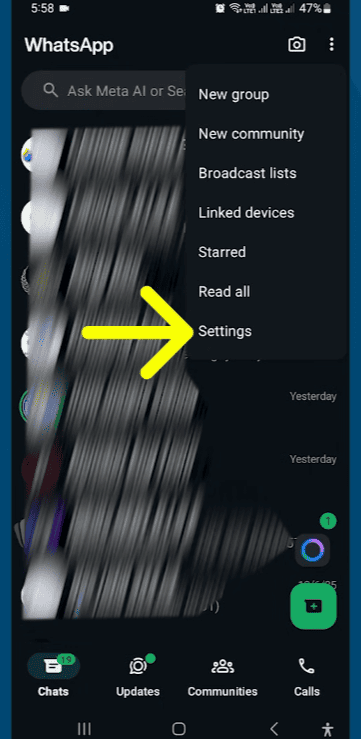
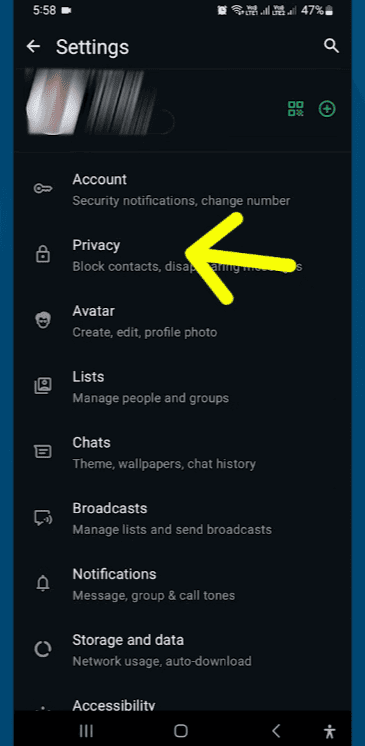
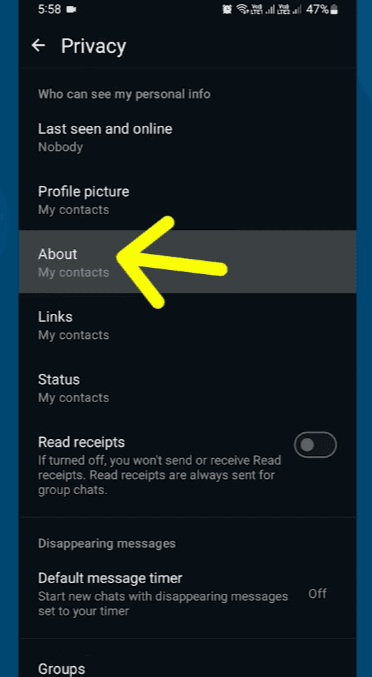
JT WhatsApp privacy settings for phone number control
JT WhatsApp includes several privacy features that give users greater control over how their accounts are displayed. While these features don’t remove phone number associations, they can help users manage what others can see.
Some commonly used privacy features include:
Hide online status
JT WhatsApp allows users to hide their online activity. This prevents others from easily seeing when they use WhatsApp.
Hide last seen
You can choose who can view your recent activity times. This will give you better control over your activity information.
Control profile visibility
You can decide who can view your profile picture and bio. Limiting personal information can improve the privacy of your account.
Manage group privacy
JT WhatsApp users can adjust group-related settings to control who can be added to their conversations.
These options primarily target your public information, while phone numbers remain the primary account identifier.
Can strangers see your phone number on JT WhatsApp
It depends on how they interact with your account.
If a stranger doesn’t have your phone number and isn’t directly connected to your WhatsApp account, they generally can’t easily access your profile.
However, your number can become visible if:
- You message the person first
- You join the same WhatsApp group
- Someone shares your contact information
- Your number is saved in their phone
Since WhatsApp is built on a phone number basis, your number plays an important role in communication.
Can you use JT WhatsApp without showing your main number
Some users do not wish to use their primary mobile phone number for instant messaging. WhatsApp allows users to register accounts using different phone numbers as needed.
For example, some people use:
- A secondary SIM card
- A separate work number
- Another personal number
This ensures that their primary contact number is separate from their instant messaging account.
JT WhatsApp will connect to your registered WhatsApp account, so the number used during registration will become the number associated with that account.
Phone number visibility in WhatsApp groups
Groups are one of the main places where users may notice the visibility of a phone number.
After joining a WhatsApp group, other members can view your number through the group information page. This helps other users identify the members involved in the conversation.
If you frequently join public communities, business groups, or large discussion groups, it is recommended that you check the group’s privacy settings to understand what information other members can access.
Difference between WhatsApp phone number and profile name
Many users confuse their WhatsApp name with their phone number. They serve different purposes:
| Feature | Phone Number | Profile Name |
| Used for account registration | Yes | No |
| Creates your WhatsApp account | Yes | No |
| Visible to contacts | Sometimes | Usually |
| Can be changed easily | Depends on account settings | Yes |
| Works as an identity method | Main identifier | Display information |
Your profile name can change at any time, but your phone number remains the core connection for your WhatsApp account.
Final Thoughts
JT WhatsApp will not create a separate phone number, nor will it replace WhatsApp’s account system. Your mobile phone number remains the primary way you register an account and connect with other users.
People who chat with you, share groups with you, or already have your contact information may see your phone number. While you can’t completely remove your phone number from your WhatsApp account, JT WhatsApp’s privacy settings allow you to control other visible information, such as your profile picture, online status, and personal details.
Understanding the visibility mechanism of your phone number can help you use JT WhatsApp more effectively and manage your account settings according to your preferences.