JT WhatsApp is a modified version of WhatsApp that adds extra privacy and customization features compared to the official app.
Because it offers options such as hiding online status, freezing last online time, and controlling message visibility, many users wonder if JT WhatsApp can make their identities completely anonymous.
In short, the answer is no. JT WhatsApp can enhance your privacy, but it cannot turn your account into a completely anonymous instant messaging account. If you are looking for a WhatsApp anonymous number experience, it is important to understand that other users can still identify you through your phone number, profile information, and chat history. JT WhatsApp only provides additional privacy settings, such as hiding online status or controlling visibility options, but it does not remove the basic identity connection of a WhatsApp account.
This article will explain the anonymity of JT WhatsApp, what privacy features it offers, and what information other users can still see.
What Does Anonymous Mean on WhatsApp
Before discussing JT WhatsApp, it’s essential to understand anonymity in instant messaging applications.
An anonymous account usually means that others cannot easily know your real identity. This may include hiding your phone number, personal information, profile picture, and online activity.
On WhatsApp, your account is connected to a phone number. Your contacts may see details such as:
- Your phone number
- Profile name
- Profile photo
- About section
- Online or last seen status
- Read receipts
Since WhatsApp accounts are based on phone numbers, complete anonymity is not the platform’s primary objective.
Is JT WhatsApp Anonymous
JT WhatsApp is not entirely anonymous. Its primary focus is on giving users more control over their privacy settings, rather than hiding their identity.
Compared to the official WhatsApp app, JT WhatsApp offers more options for managing what others can see. For example, users can hide their online status, turn off the input indicator, or prevent others from knowing whether a message has been read. These privacy settings give users more control when they want to message anonymous WhatsApp and keep their activity less visible during conversations.
However, your account is still linked to your mobile phone number. Even if someone has saved your number or identified your personal information, they may still know your identity.
JT WhatsApp should be described as a privacy-focused version of WhatsApp rather than an anonymous messaging service.
Which JT WhatsApp Features Improve Privacy
JT WhatsApp includes several features that can make daily conversations more private.
Hide Online Status
One of the most popular privacy features of JT WhatsApp is hiding online activity. This feature allows users to use WhatsApp without showing their online status to others.
This feature offers more control for users who don’t want to constantly receive attention or messages while online.
Freeze Last Seen
The “Freeze Last Online Time” feature allows users to keep their last online time unchanged. Others may see earlier event times instead of the latest ones.
This feature can help users protect their activity privacy when they don’t want others to track their usage habits.
Hide Blue Ticks
WhatsApp allows users to control read receipts. By hiding the blue checkmark, other users may not be able to tell whether the message has been opened.
This feature is very useful for users who want more freedom when replying to messages.
Hide Typing and Recording Status
Some users do not want the status of typing a message or recording a voice message to be displayed on the screen.
JT WhatsApp allows you to hide these notifications, making conversations more relaxed and comfortable.
Control Profile Visibility
JT WhatsApp offers more customization options for personal profile privacy. Users can decide who can view certain account details through privacy settings.
Can You Send Anonymous Messages on WhatsApp
No, WhatsApp does not have a built-in feature for sending messages completely anonymously.
When you send a message on WhatsApp, the message is linked to your account. Recipients can typically view your profile information according to your privacy settings.
WhatsApp can hide some activity details, such as your online status or read receipts, but it cannot make messages completely anonymous.
If someone receives a message from your account, they can still associate that message with your WhatsApp profile.
Can JT WhatsApp Hide Your Identity From Contacts
JT WhatsApp can hide some parts of your online identity, but not all information.
For example, you may hide:
- Online status
- Last seen time
- Typing indicator
- Recording indicator
- Read receipts
However, contacts may still identify you through:
- Your phone number
- Your profile name
- Your profile picture
- Your conversation style
- Shared personal information
Privacy settings can reduce visibility, but they do not completely remove your identity.
JT WhatsApp Privacy Features vs Anonymous Apps
JT WhatsApp and anonymous messaging apps have different goals.
| Feature | JT WhatsApp | Anonymous Messaging Apps |
| Phone number account | Yes | Sometimes no |
| Hide online status | Yes | Depends on app |
| Hide read receipts | Yes | Depends on app |
| Custom privacy settings | More options | Usually limited |
| Full identity hiding | No | Some apps focus on this |
JT WhatsApp improves privacy inside the WhatsApp system, while anonymous apps are designed around reducing identity connections.
Why Do Users Want More Privacy on JT WhatsApp
Many users are not trying to completely hide their identities; they simply want to have better control over their daily communications.
Common reasons include:
- Avoiding pressure to reply immediately
- Keeping online activity private
- Reducing unwanted attention
- Managing personal and work conversations separately
- Having more control over message settings
For these users, JT WhatsApp privacy tools can make conversations more comfortable.
How to Make JT WhatsApp More Private
Although JT WhatsApp is not anonymous, users can adjust several settings to improve privacy.
Review Privacy Settings
Check options related to:
- Last seen
- Online status
- Profile photo visibility
- Read receipts
- Group invitations
Choosing suitable settings can reduce unnecessary exposure.
Limit Profile Information
Using less personal information in your profile can reduce the identifiability of your account.
For example, some users may choose a simple username or restrict public access to their details.
Manage Contacts Carefully
Your privacy also depends on who can access your contact information. Organizing your contact list can help you control who can contact you.
Is JT WhatsApp More Private Than Official WhatsApp
JT WhatsApp offers more privacy controls than the official WhatsApp app, which is the main reason why many users choose the modified version. While the official WhatsApp app already includes some basic privacy options, JT WhatsApp adds more settings that allow users to manage their online activities more granularly. These extra controls can provide a more flexible experience for users who want features similar to an anonymous WhatsApp text sender, allowing them to have better control over how their messages and online status are displayed.
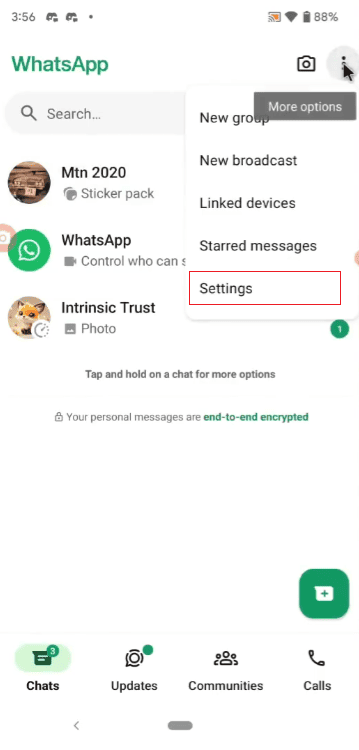
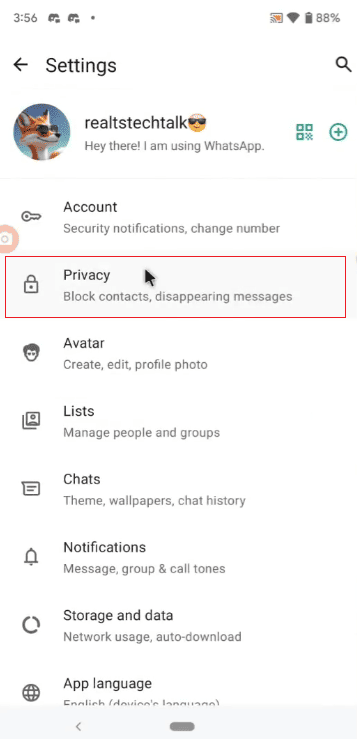
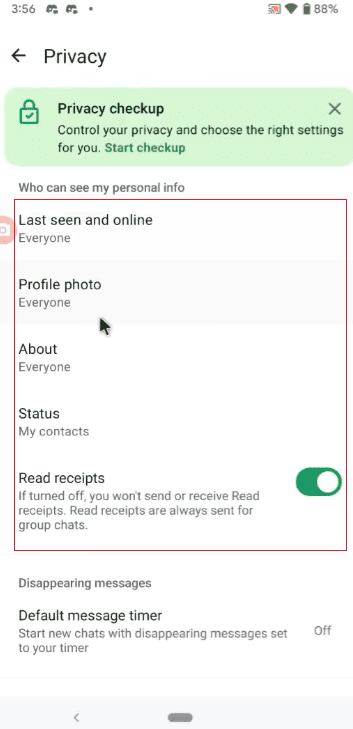
For example, the official WhatsApp app allows users to hide their last online time, control the visibility of their profile picture, and disable read receipts. JT WhatsApp adds features such as hiding input status, hiding the recording indicator, freezing last online time, and controlling more details of activity during conversations.
These additional settings give users greater freedom when using WhatsApp. They can decide when to show their online status, whether others can see certain actions, and how much information is displayed in their profile.
In short, the official WhatsApp app focuses on basic privacy settings, while JT WhatsApp offers more customization options for users who want greater control over their daily messaging experience.
Final Thoughts
JT WhatsApp is not an anonymous messaging app. It cannot completely hide your identity because your account is still linked to your phone number and profile.
However, JT WhatsApp offers many privacy features to help users control what others can see. For example, options such as hiding online status, freezing last online time, and managing read receipts make daily conversations more private.
If you want to reduce the visibility of your activities to others when using WhatsApp, JT WhatsApp offers some useful tools. However, if you’re looking for complete anonymity, JT WhatsApp isn’t designed for that.